Features · Boxes and displays
Vouchers and pack sizes
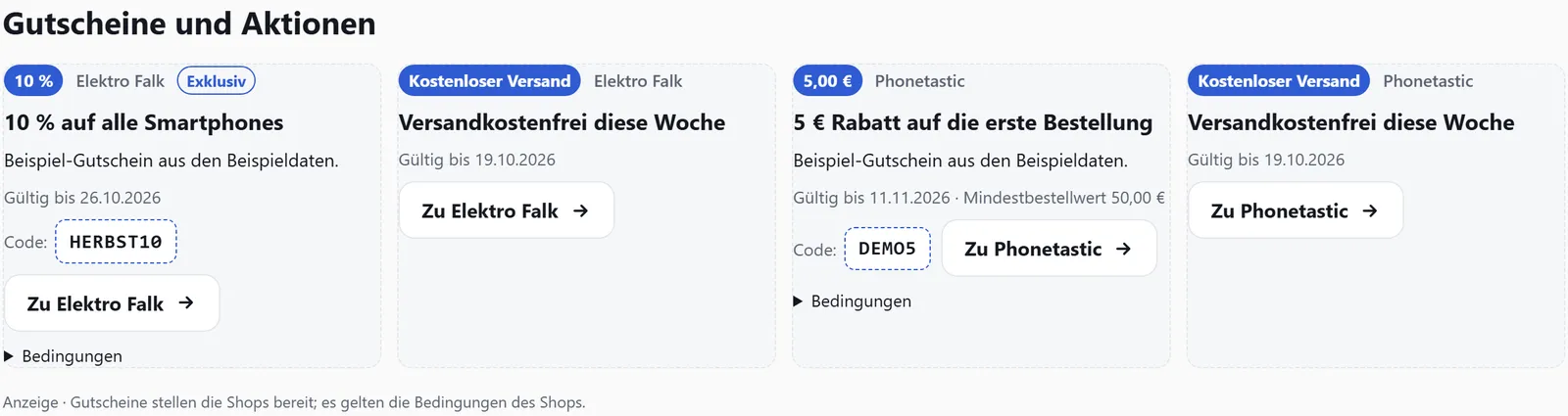
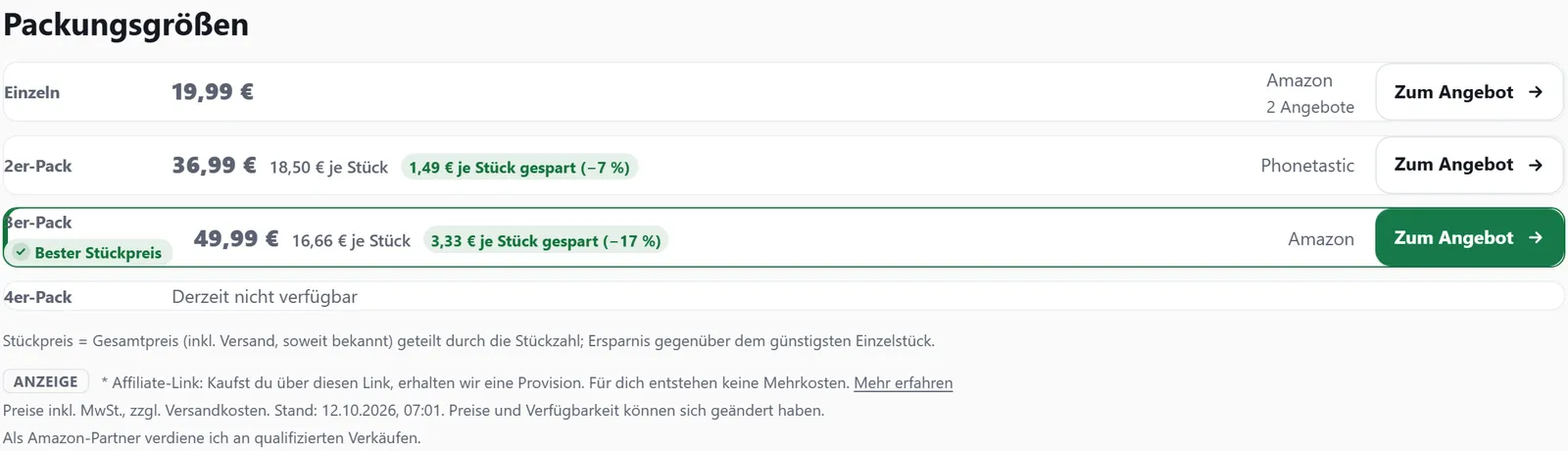
Two boxes that help readers pay less: the voucher box shows current codes and deals from the merchants in your partner programmes. The “Pack sizes” box compares single items, 2-packs and 3-packs by price per piece.
In all plans
What it does
- Vouchers every 6 hours from networks such as Awin, Tradedoubler and Webgains
- Add your own codes in the dashboard, hide the ones that don’t fit
- “Show code” reveals the code and copies it
- Multipacks are recognised as offers of the single product
- Price per piece including shipping, and the saving per piece
- Pack sizes as tabs in the price comparison
Where the vouchers come from
Every 6 hours affilinode fetches the vouchers and deals of the merchants you have joined – from Awin with the Publisher API token, from Tradedoubler with the vouchers token, from Webgains with the same credentials as the product feed. Expired ones disappear by themselves.
Under “Vouchers” in the dashboard you hide the ones that don’t suit your site and add your own, such as an exclusive code a merchant gave you – with shop, code, discount, minimum order value, validity, link and conditions. The link gets your website’s tracking ID like any other offer link.
Vouchers on your site
The box shows cards with value, validity, minimum order value and “Show code”. A click reveals and copies the code; where the network allows it, it also opens the shop in a new tab. Without JavaScript and on AMP pages the code is shown next to the link.
Below product boxes, coupons="1" shows up to three vouchers from the shop with the best offer.
Recognising pack sizes
A 2-pack or 3-pack is not a product of its own but an offer of the single product with a quantity. affilinode recognises wording such as “3-pack”, “Set of 3” or “Multipack” – carefully: “4x HDMI” or “2-in-1” don’t count. You can change the quantity of any offer in the dashboard. A product’s best price is always the price for one piece.
Box and price comparison
The “Pack sizes” box shows, for each size, the cheapest offer you can buy with total price, price per piece (including shipping where known) and the saving per piece against the cheapest single item; the best price per piece is highlighted. In the price comparison, sizes appear as tabs or as a short note that only shows up when there is a real saving.
Examples
Up to three voucher codes from one merchant.
[affilinode_coupons merchant="…" kind="code" limit="3"]Product box with the merchant’s vouchers below.
[affilinode_product id="…" coupons="1"]Pack sizes by price per piece, in stock only.
[affilinode_packs id="…" sort="unit" only_available="1"]Good to know
- There are never vouchers for Amazon, and your own vouchers can’t be attached to an Amazon shop either. ADCELL, eBay, AliExpress and your own product feeds don’t supply vouchers.
- The terms of each partner programme apply: exclusive codes only on your own site, no passing them on to voucher portals, and no voucher promotion where a programme rules it out.
- Pack sizes use prices like every other box – Amazon prices only from the API and at most 24 hours old. There is no price history for them.
Which shops you can use depends on the plan.
Guide in the help center (German): gutscheine, packungsgroessen
Goes well with
Try it yourself
14 days with all features, no payment details. Afterwards your account continues on the free Basic plan.