Features · Boxes and displays
Product pages
Product pages give every product its own page on your WordPress site. If you want, the plugin creates them every hour for new products and adds questions from the data sheet, category hubs and breadcrumbs.
In all plans
What it does
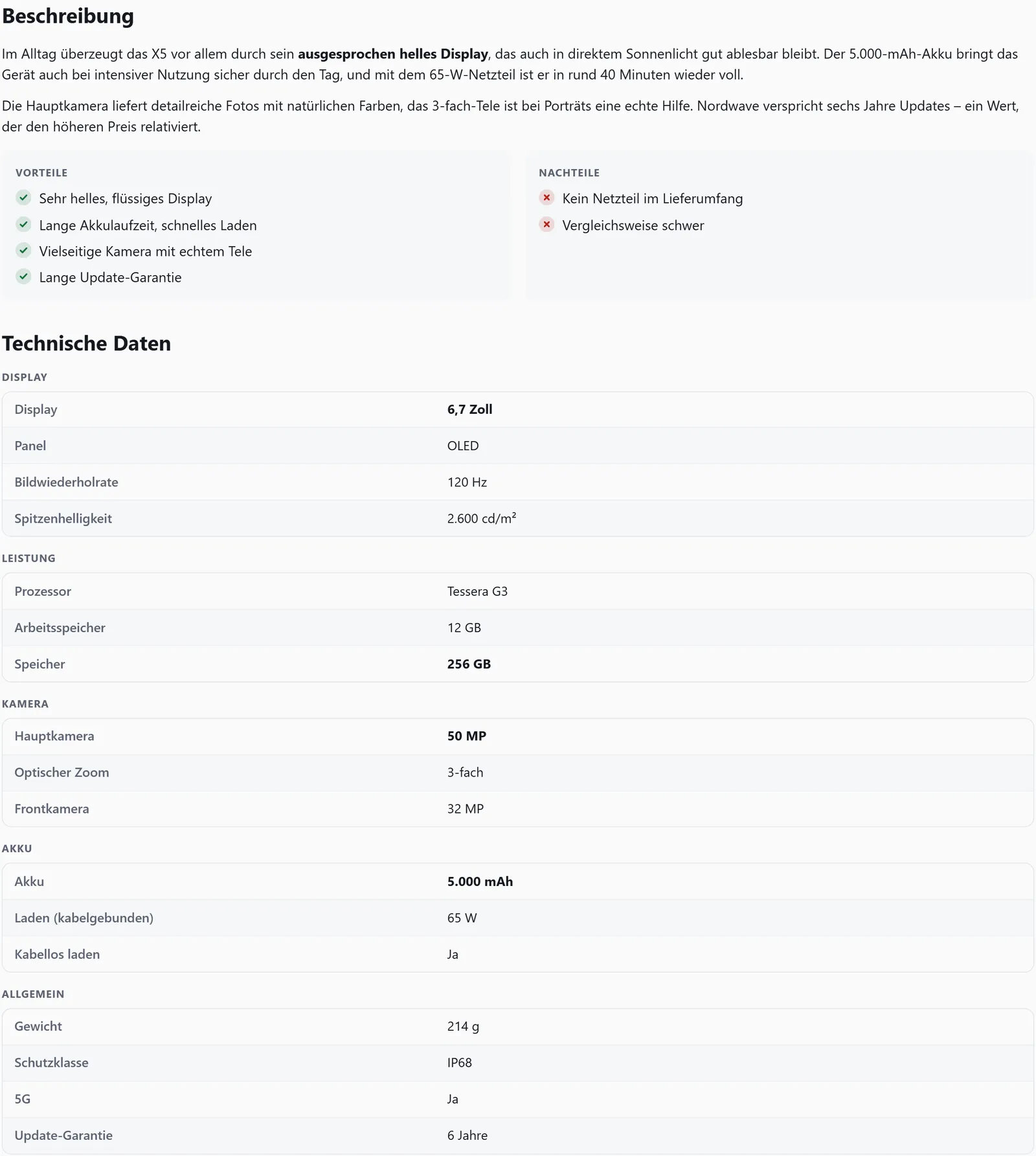
- Box, description with pros and cons, your own text, price comparison and technical data
- Created automatically for every active product, as a draft or published right away
- Frequently asked questions from the data sheet with schema.org FAQPage
- Category hubs with subcategories, search and a sitemap entry
- Breadcrumbs along the categories, coordinated with Yoast SEO and Rank Math
- One page per language with Polylang or WPML
Letting the plugin create pages
Switch on product pages under Settings → Product pages. With “Create a product page for every product automatically”, the plugin reads the changes in your catalogue every hour and creates a page for each active product that has none yet – with title and excerpt from affilinode, as a draft or published.
Existing pages are never changed, and pages you delete are not created again. If a product is deleted in affilinode, its page becomes a draft; nothing is deleted.
What a product page shows
The page shows the product box, the description with pros and cons, your own text, a price comparison with up to ten offers and the technical data as a table – each section can be switched off. At the end it links to the product pages of alternatives, accessories, spare parts and more products from the same category.
Description and data sheet are also available in any other post with [affilinode_details]; empty sections are left out.
FAQ, category hubs and breadcrumbs
The questions are built only from data sheet values – every answer is exactly one value, nothing is made up. They are marked up as schema.org FAQPage, once per page.
A page you choose becomes the overview of all categories, with a hub for each category below it showing subcategories, “Best in category”, the product search and the product pages. Hubs have clean canonicals and appear in the sitemap of WordPress, Yoast SEO or Rank Math. Breadcrumbs are handed to Yoast SEO and Rank Math through their filters, without duplicate JSON-LD; without an SEO plugin the plugin outputs its own BreadcrumbList.
Product pages per language
With Polylang or WPML, the automatic sync creates one product page per language, with title and excerpt in that language, and links them as translations. hreflang and the language switcher come from the language plugin. Existing pages without a language count for the default language.
Examples
Technical data only, with level-3 headings.
[affilinode_details id="…" show="specs" heading="3"]Up to six questions from the data sheet.
[affilinode_faq id="…" limit="6"]Visible breadcrumbs along the categories.
[affilinode_breadcrumbs]Good to know
- After switching product pages on, save your permalinks once.
- If another SEO plugin such as All in One SEO, SEOPress or The SEO Framework outputs breadcrumbs, the plugin adds nothing.
- FAQ markup can be left out per box with schema="0".
- The optional price history on product pages follows Amazon policy 6(y): if your account uses Amazon, it stays off unless a written exception is confirmed.
Which shops you can use depends on the plan.
Goes well with
Try it yourself
14 days with all features, no payment details. Afterwards your account continues on the free Basic plan.